
One of the biggest frustrations we've come across recently is how difficult it is to develop and deliver applications for Apple's App Store.
Well, we think that we've come up with a solution, especially if you want to launch a video service for the iPhone. Our team has released into beta a fully configurable iPhone App that's ready to submit to the App Store in seconds.
All you have to do is to specify what Channel and Playlist you wish to add and then add the graphics for the App icon and launch screens and you're done. It really is as easy as that.
If you want any customization, then our team can also take care of that by adding additional functionality according to your brief.
Tuesday, November 08, 2011


Tuesday, September 06, 2011
Going Social
When we first designed VidZapper, we added a number of social features, including user generated content and the ability to create content groups, but these features have become sadly neglected since, largely due to the fact that they were sparsely used by our customers.
However, we believe that these features are going to be increasingly important for some of the services that we'll be powering in the future so we've dedicated time and resource to add in more social features.
The Player Builder now boasts integration with ShareThis and the ability to share an individual video link by email, Twitter, Facebook, Yahoo! etc..

However, we believe that these features are going to be increasingly important for some of the services that we'll be powering in the future so we've dedicated time and resource to add in more social features.
The Player Builder now boasts integration with ShareThis and the ability to share an individual video link by email, Twitter, Facebook, Yahoo! etc..

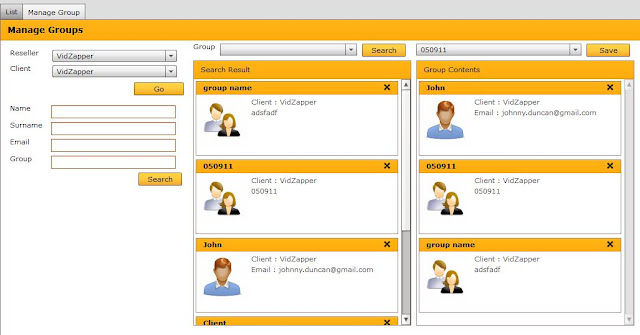
At the same time, we've resurrected an original VidZapper feature and added in the Manage Groups function, so now it's possible to create Groups (and Groups within Groups):
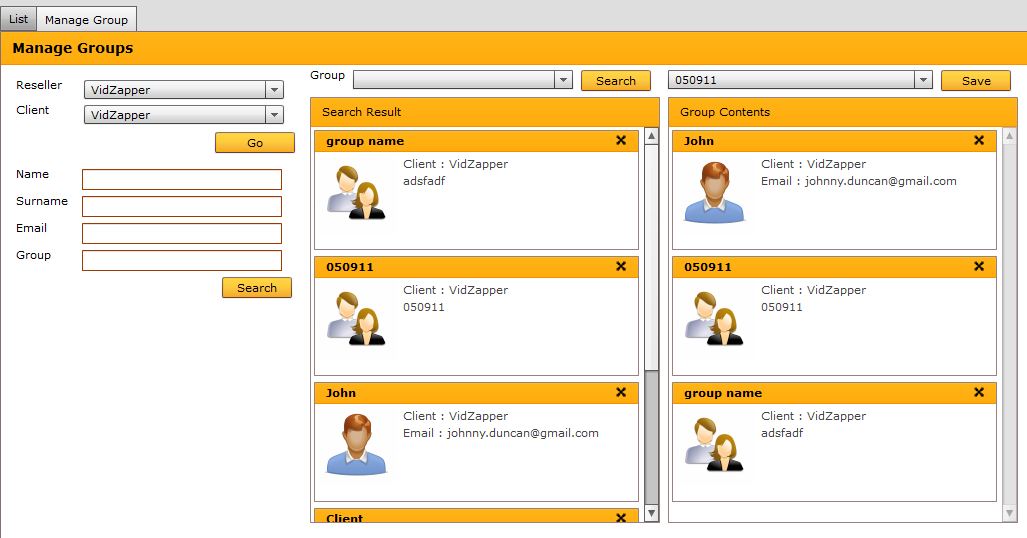
This will be added to the API and will enable complex functions like the ability to share videos with permanent or temporary Groups. We also intend to use it in forthcoming launches of a specialised version of VidZapper that features workflow at its core and should appeal to production companies and broadcasters.
Of course, VidZapper also boasts a wide range of other social functions such as the ability to easily build Facebook video apps and share them, creating and sharing embedded videos on blogs and publishing feeds out as RSS, MRSS, Atom, iTunes, etc..
Of course, VidZapper also boasts a wide range of other social functions such as the ability to easily build Facebook video apps and share them, creating and sharing embedded videos on blogs and publishing feeds out as RSS, MRSS, Atom, iTunes, etc..
Wednesday, August 10, 2011
New, Improved Player Builder
We've been working hard to improve the Player Builder in VidZapper, and we've just released the latest version.

We think that it's not only easier to use, but boasts a range of new features, including:
You can also generate Flash, HTML5 or dynamic versions of the Players and simply cut and paste the code into your website or into your content management system.

We think that it's not only easier to use, but boasts a range of new features, including:
- Search
- Share, including Twitter, Facebook and Email
- Change channel logo
- Add title
- Better resizing and drag and drop
- Add background colour
- Set background transparency
- Add background image
You can also generate Flash, HTML5 or dynamic versions of the Players and simply cut and paste the code into your website or into your content management system.
Wednesday, March 16, 2011
VidZapper v3 Is Here
This week we launched the new version of VidZapper with a huge number of improvements and enhancements. Here are some:
Improved Navigation – navigation has been improved and simplified; views are more consistent.
Improved Grids – grids now sort over the whole data set and it is possible to sort by columns.
User Management – the user management and permissioning has been improved and extended.
New Search Function – most views now have a filtered search function that enables all content in the data set to be searched dynamically; the search covers all main metadata fields.
Keyword Management – it is possible to centrally manage the keywords used on a channel by channel basis and there is an auto-suggest to prevent duplication in the metadata view field.
Custom fields – it is now possible to add custom fields to the metadata.
Improved Category Management – the category management has been enhanced and improved.
Multiple CDN & Cloud Support – it is now possible to set up accounts on multiple sources and directly import content into the system from any repository.
New Upload Tool – StreamZapper is being discontinued and the ability to access and upload content is now integrated into VidZapper. Multiple accounts on different CDNs can be supported:
Improved Security – the security model for the application has been overhauled and improved with the introduction of session management.
Player Builder Enhancements – the player builder features new skins, additional fields and configurations and the ability to generate cross-platform code that will automate delivery to mobile, tablet and PC platforms. The base code to VZPlayer has been updated.
iTunes Export – it is now possible to export playlists directly to an iTunes account; there have been other improvements to the Distribution function, including the addition of Atom support.
Facebook Player – the system now supports a Facebook Player app.
VAST Support – VidZapper now supports video advertising standard templates as specified by the IAB, bringing direct support for the latest ad serving software such as Tremor, Liverail and systems such as DART, Adtech and Atlas. A new Content type ‘VAST’ has been added.
Pre-roll Improvements – the pre-roll function now forces a pre-roll anywhere an ad is placed in front of a content item.
Live Mobile Support – a tool has been developed to enable live events to be distributed over a wide range of mobile networks concurrently by implementing real time transcoding of the rtmp stream into formats such as rtsp, m3u8 and sure streaming.
Previews – the system now features video and player previews throughout the system, including at CDN level.
Audio Support – the system now supports audio content, with the player able to play MP3 files and combine MP3 files with video content; audio pre-roll ads can also be included and support for live audio streams.
API – the API has been improved and extended.
Improved Navigation – navigation has been improved and simplified; views are more consistent.
Improved Grids – grids now sort over the whole data set and it is possible to sort by columns.
User Management – the user management and permissioning has been improved and extended.
New Search Function – most views now have a filtered search function that enables all content in the data set to be searched dynamically; the search covers all main metadata fields.
Keyword Management – it is possible to centrally manage the keywords used on a channel by channel basis and there is an auto-suggest to prevent duplication in the metadata view field.
Custom fields – it is now possible to add custom fields to the metadata.
Improved Category Management – the category management has been enhanced and improved.
Multiple CDN & Cloud Support – it is now possible to set up accounts on multiple sources and directly import content into the system from any repository.
New Upload Tool – StreamZapper is being discontinued and the ability to access and upload content is now integrated into VidZapper. Multiple accounts on different CDNs can be supported:
Improved Security – the security model for the application has been overhauled and improved with the introduction of session management.
Player Builder Enhancements – the player builder features new skins, additional fields and configurations and the ability to generate cross-platform code that will automate delivery to mobile, tablet and PC platforms. The base code to VZPlayer has been updated.
iTunes Export – it is now possible to export playlists directly to an iTunes account; there have been other improvements to the Distribution function, including the addition of Atom support.
Facebook Player – the system now supports a Facebook Player app.
VAST Support – VidZapper now supports video advertising standard templates as specified by the IAB, bringing direct support for the latest ad serving software such as Tremor, Liverail and systems such as DART, Adtech and Atlas. A new Content type ‘VAST’ has been added.
Pre-roll Improvements – the pre-roll function now forces a pre-roll anywhere an ad is placed in front of a content item.
Live Mobile Support – a tool has been developed to enable live events to be distributed over a wide range of mobile networks concurrently by implementing real time transcoding of the rtmp stream into formats such as rtsp, m3u8 and sure streaming.
Previews – the system now features video and player previews throughout the system, including at CDN level.
Audio Support – the system now supports audio content, with the player able to play MP3 files and combine MP3 files with video content; audio pre-roll ads can also be included and support for live audio streams.
API – the API has been improved and extended.
Thursday, March 03, 2011
Distribution To Third Party Video Services
You can submit your videos to a wide range of search, portal and aggregation sites using VidZapper's inbuilt distribution function:
Blinkx - http://www.blinkx.com/rssupload
Truveo - a video distribution engine - http://developer.truveo.com/
Yahoo! Video - http://video.search.yahoo.com/mrss/submit
The abilities to submit to YouTube (http://www.google.com/support/webmasters/bin/answer.py?hl=en&answer=80472) and iTunes are natively supported by VidZapper.
Thursday, January 06, 2011
Setting Up A Facebook Channel with VidZapper
Here is a guide to setting up a Facebook channel with VidZapper using VZFBPlayer v 0.1.
1. Files Setup
a. Install the files in the provided
b. Make a note of the URL and file paths that will be required for the Facebook app below.
c. Edit channelid, clientid and playlistid values in config.php to reflect the client, channel and required playlist (only one playlist is supported in the initial release) and set the path for your application:

2. Create The Facebook Application
a. Go to http://www.facebook.com/developers
b. Select the ‘New Application’ option on right hand side of page:

c. Where you can enter your Apps name please enter your required Channel name:

d. Click on the ‘Agree’ tickbox and save.
e. Then complete the security check:

Congratulations! You’ve created your Channel on Facebook. Now you need to configure it.
3. Configure You Application
a. You will see four links on the left hand side of the page:
About
Web Site
Facebook Integration
Mobile And Description
Advanced
b. First of all, click on the About and complete the contact details and provide a name for your application – usually this will be the channel name:

c. Then click on ‘Facebook Integration’ and enter the appropriate values:

i. Canvas Page : http://apps.facebook.com/vidzapper (this link goes outside odesk.com) // change to the name of your channel
ii. Canvas URL : http://fblogics.com/canvii/facebook/vidzapper/ (this link goes outside odesk.com) // this is where you set the path to the
iii. Canvas Type : FBML // set fbml
iv. iFrame Size : Click on the tickbox for ‘Show scrollbars’
d. Page Tabs :

i. Tab Name : <> // set the tab name to the name of your Playlist here
ii. Tab URL : index.php
iii. you have to copy Tab URL :- http://apps.facebook.com/vidzapper/index.php (this link goes outside odesk.com) // change
e. Finally, click the ‘Save’ button
Wednesday, November 24, 2010
Submitting Videos To Search Engines
We've long had all the tools for video search engine optimisation built into VidZapper.
Here's a quick guide on how to use them.
First of all, you will need to open an account at www.google.com/webmasters/tools and register and verify your account.
Next, you go to VidZapper and select Distribution > Export.

Here's a quick guide on how to use them.
First of all, you will need to open an account at www.google.com/webmasters/tools and register and verify your account.
Next, you go to VidZapper and select Distribution > Export.

Select your Channel and Playlist, then the MRSS format and add your Player Base URL and DirectLink URL so that the resulting video in played in your website and not the video player directly.
Then click 'Generate'. You can then cut and past the resulting file on the right hand side into a notepad file. This is your MRSS sitemap for this playlist. You can repeat the exercise for any other playlist you wish to submit.
Monday, November 08, 2010
VidZapper Integrates With WordPress
We've been launching more and more channels using WordPress as the content management system, including Control TV, and have launched a demo site to show how easy it is to set up quite a comprehensive site in an hour or so without writing a line of code.
You can spend a lot of time replicating what is by today pretty basic functionality such as contact forms, forums, ecommerce and even more specialist functionality such as requiring logins, or use the vast array of freely available plugins and widgets for WordPress.
And since building players is now a cinch using VidZapper's Player Builder, you can be up and running in no time.
Wednesday, September 15, 2010
VZLive Sneak Preview
We do an awful lot of live events here at VidZapper. The last couple of weeks alone has seen the usual simulcast of TV stations, live world championship boxing, political party rallies, government announcements and religious services. Now we're gearing up to a six week major live event with 24 x 7 streaming from multiple feeds in the US sponsored by the biggest names in US business.
It's resulted in work on developing something we think is quite unique - the VZLive Mixer.

The Mixer allows you to select any file from your archive, along with any live feed and place it in your playlist queue and then select the order in which it is seen. We've set this up so that it can take feeds from multiple live publishing points and output to rtmp and m3u8 - i.e. web and mobile. We're also building in a feed delay in case anything 'untoward' happens.

On top of our unique scheduling application, VZLive is another step onwards from the run of the mill video management systems out there...
Wednesday, September 01, 2010
Creating an iPad Player With VidZapper
One of the exciting new features we've added to VidZapper is the ability to build iPad and iPhone players without writing a line of code.
We somewhat disingenuously call this the HTML5 version of VZPlayer. Here's how:
1) Go to your Channel and click on Player, then click on Add Player:

2) This will open up the Player Builder:
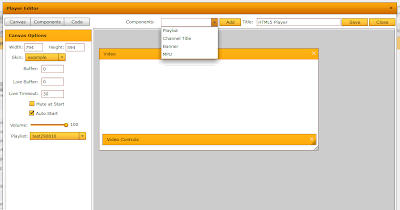
3) Now you can select and add components such as the Video, Controls and Playlist from the drop down list.
4) Select a playlist from the dropdown on the left and you're done!
5) You can preview your Player by clicking Code and selecting the HMTL5 option, opening it in a HTML5 compatible browser such as Google Chrome or Apple Safari. You can also view it on an iPad or iPhone of course.
Sunday, August 29, 2010
VidZapper Upgraded
We've just released a major new upgrade of VidZapper. Version 2.6 has a whole host of exciting new features and improvements.
Scheduler v2 – the new release of the scheduler enables drag and drop scheduling against a timeline and also supports overlays. Therefore it is possible, for example, to schedule a simulcast for 24 hours and then to overlay particular programmes, slots or ad breaks. Schedules can be pre-prepared for a limitless amount of time in the future.
Player Builder v2 – the latest version of the player builder enables sophisticated players to be built with no coding at all. A new scheduling component has been added, along with a considerable enhancement over the settings and controls for the player, which can only be exported in Flash/Flex at present. The Player Builder is fully compatible with VZPlayer 3.0.
HTML5 Support – you can now generate HTML5 players that will work on any HTML5 compatible browsers, provided you use compatible video. These players are ideal for iPhone and iPad distribution.
Previews – players and videos can now be directly previewed.
Faster Searching – in all views a new, faster search algorithm has been implemented; this particularly helps clients with large data sets. Also, search queries now paginate.
Expiry Date – a stamp is now placed on expired content.
Statistics Enhancements – the speed of lookup has been considerably enhanced and stats can now be filtered by the hour.
Content IDs – meaningful names can be given to metadata content ids, e.g. SD/HD, or Web/iPhones/Blackberry so that it is easy to manage different content types; also it is now possible to search by All content ids. This feature can also be used for supporting multiple language players.
VZPlayer 3.0 – a new version of VZPlayer is available with far greater customisation, enhanced performance and control and a smaller footprint.
API – the API has been considerably expanded.
Please contact us if you'd like a demo of the new system.
Thursday, June 17, 2010
VidZapper On The iPad
Despite being Flex based, it was pretty easy getting VidZapper to work on the iPad:

I simply loaded an app called Desktop and then connected to a remote server, pointed the browser to the VZAdmin console and then logged in. Now I can get into it with two taps on the iPad, or indeed my iPhone.

I simply loaded an app called Desktop and then connected to a remote server, pointed the browser to the VZAdmin console and then logged in. Now I can get into it with two taps on the iPad, or indeed my iPhone.
Tuesday, June 08, 2010
Sportzzone's Up And Running

Great to see the multichannel Sportzzone TV up and running in time for some major sailing action from Korea. The internet still lacks great destinations for sports content, so we hope this will be a great success, especially since the team behind it have a ton of experience in this field.
Sunday, June 06, 2010
Going Live and Scheduled
We do a very large number of live events on VidZapper. This week, for example, sees addresses by the Spanish Prime Minister, live European Speedway and live World Match Racing Tour sailing from Korea.

Setting up live events takes seconds on VidZapper and now we're also introducing new simulcast technology that enable live broadcast streams to be shown online at the same time as live telly. Actually, we've had basic technology to enable simulcasting for a long time, used by broadcasters such as Spain's Giralda TV, but now we've introduced the ability to 'over schedule', or drop in new or different content via our new VZSchedule tool.
You can now create schedules for any date and enable 'cut outs' by placing on demand or local video content within the schedule:

For example, you can replace ad breaks with your own ads, or change content that you don't have rights for online.
Saturday, May 08, 2010
VZ Goes Mobile
With the latest release of VidZapper we're now supporting a wide range of mobile devices, including Android devices, iPads and iPhones.
Here's an example iPhone app built by our partners at Vivocom for leading European bank BBVA:


Here's an example iPhone app built by our partners at Vivocom for leading European bank BBVA:

Here is the landscape view with a video carousel and the portrait view with the playlist, both managed from VidZapper:


Wednesday, May 05, 2010
VidZapper v 2.5 Is Here!
We’ve been gradually extending VidZapper’s capabilities and are delighted to announce that the new version is ready for release. We’re already rolling out our new configurable VZPlayers for multiple platforms, along with VZPlugins and the ability to create widgets for a wide range of social networking sites and portals.
New Interface
We’ve revamped the interface for VZAdmin, making it easier to use and navigate.
Detailed Statistics
The system has a new statistics system which is based on a player ‘heartbeat’, providing second accurate metrics on all aspects of playout. This is also used for VZSync (see below). You can also query the bandwidth and storage you’re using in real time.
Extended Character Support
Special characters are now supported in metadata fields, including support for Unicode 8 and Unicode 16 characters.
VZFeeds
You can now create sophisticated RSS and MRSS feeds to distribute your content to third party systems, including deep linked content.
iPhone and Android Support
There are new players for the iPhone and Android cellphones.
Ecommerce
You can now add values to content items so that they can be placed into a shopping basket or ecommerce system such as Paypal or Ecwid.
Extended Content Search
Content can now be searched by id.
Improved User Generated Video Capabilities
We’ve considerably enhanced the user generated capabilities of the system and added them to the API.
VZSync
VZSync enables in and out points to be defined for content and for events to be associated with these points. These events can then be targeted to areas of the video player. For example an overlay on the video can be triggered, or the changing of a banner ad.
Extended API
We’ve considerably extended the API to make the system far more powerful for developers. The API has now been broken down into a number of interoperable web services.
VZPlayer 2
A new Player framework has been introduced that is very configurable. A Player can be built from scratch in a few minutes using an XML configuration file. Designers can also totally redesign the Player by using the built in skins.
Tuesday, March 30, 2010
Two Million For Easter
 We're seeing extraordinary traffic for the Easter celebrations being broadcast by Giralda TV using the VZPlayer designed by vivocomtech, and using VZPlugins to integrate a live chat feed from Facebook.
We're estimating up to 2 million viewers over the course of the week building up to and over Easter.
Saturday, March 27, 2010
New Interface for VidZapper
Here's a quick sneak preview of our new v2.5 interface. Feedback gratefully received:


Monday, March 22, 2010
Going Mobile
Hot on the heals of the VidZapper iPhone app developed by our colleagues at vivocomtech in Spain we've just begun testing the beta version of our new Android app. It works well on WiFi and we'll see how it fares on Vodafone's 3G network later today.
One thing that particularly impressed me was the quality of the video: this was encoded using Handbrake, which is well worth investigating if you're preparing video for mobile distribution.
We'll post a trial app with instructions in due course.
Monday, March 01, 2010
Ten Steps To Creating Widgets With VidZapper
Widgets are becoming more and more popular and VidZapper gives you a very easy way of creating widgets for a wide range of outlets including Facebook, Beebo, Blogger, WordPress and iGoogle. It only takes a couple of minutes in each case.
Here's how:
1) Go to www.widgetbox.com and create an account ( if you don't already have one)


4) Next you'll need to name the widget and then click onto the next screen. Now, get the embed code for your VZPlayer, e.g.:

5) You can then set the size of your player (these should match the size of the iframe and the VZPlayer itself if possible).


 10) Finally, just follow the instructions on the Widgetbox screen for the plugin you want to create!
Here's how:
1) Go to www.widgetbox.com and create an account ( if you don't already have one)

2) Click on the green 'Make a Widget' button
3) Select HTML/JS

4) Next you'll need to name the widget and then click onto the next screen. Now, get the embed code for your VZPlayer, e.g.:


6) Once you've entered the parameters above you should now be able to preview and save your widget.
7) Once you have your widget saved you can access it by clicking on 'Widgets Made' in the top navigation bar:

8) Then click on 'Test & Get Widget' from the left hand menu:

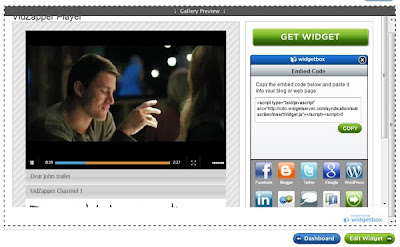
9) This will then show you the code you need to create widgets on a wide number of platforms:
 10) Finally, just follow the instructions on the Widgetbox screen for the plugin you want to create!
You'll have noticed that Beebo works in a slightly different way - again just follow the instructions on the screen.
Subscribe to:
Posts (Atom)